 mni-ml
Optimizing the Math
The math behind machine learning, as we have now shown, is actually fairly simple. At the most basic level, we are just performing operations on a bunch of numbers. The issue that arises now is that we have TOO many numbers. Modern transformers have billions, if not trillions of parameters. Tracking the history of each of these numbers and performing all our operations naively would not only take forever, but would consume a ton of memory. How do we fix this?
We previously introduced the idea of a Scalar object. This gave us a good conceptual understanding, but in reality models don’t operate on individual numbers in this way. Consider an image classifier that takes as input a 224x224 RGB image. In total, the image would be comprised of 150528 numbers, and storing each of these numbers as a unique Scalar object would blow up memory.
This is where tensors come in. A tensor is essentially a multidimensional array of numbers. A 0D tensor is just a scalar, a 1D tensor is a vector, a 2D tensor is a matrix, and so on. Now, using tensors our image can be represented as a single object with the shape (3,224,224) , 3 channels, each with 224 rows and 224 columns. We can store all 150528 numbers in a single object with a shared history and one function reference.
Beyond just memory, tensors make it easier to speed up our computations. Consider matrix multiplication, one of the most important mathematical operations in machine learning. The core of nearly every neural network is just matrix multiplication with an activation function. If we were to perform a matrix multiplication considering each number one at a time, this naive approach would have time complexity of .
We can do a lot better than this by noticing that each output element is independent of other outputs, thus can be computed at the same time. Given threads, we can reduce this time complexity down to . For a 100x100 matrix, that’s ~10000x faster. This is the idea behind parallelism.
Considering just the CPU for now, modern CPUs have multiple cores. By using multithreading we can split work across threads on different cores to reduce computation time. Going back to the matrix multiplication example, we can assign rows 0-63 to thread 1, rows 64-127 to thread 2, and so on. Using multiple threads, the time complexity becomes where is the number of threads used.
In practice, creating and destroying threads for every operation has a very high overhead that may actually slow down computation for small tasks. That’s why a worker pool is used. A worker pool is a collection of threads that are initialized once. We then submit a task to the worker pool, and worker threads will pick up the task and execute them when they are available. After all threads are completed, we have our final result.
Worker pools provide us the benefit of multithreading without the overhead of creating and destroying threads. Unfortunately, CPUs typically only have somewhere in the range of 4-32 cores. What happens if we need to parallelize THOUSANDS of operations? That’s where graphics processing units (GPUs) come in. GPUs were originally designed for rendering graphics, computing the colours of millions of pixels in parallel, equipped with thousands of smaller cores made for parallel tasks. This transfers incredibly well to what we need in machine learning, and allows us to further optimize both training and inference.
For the purposes of this blog we discuss CUDA (Compute Unified Device Architecture), NVIDIA’s programming platform that allows us to write functions, called kernels, that execute on the GPU. The concepts behind GPU programming for machine learning are the same, regardless of the interface.
At a high level, to use the GPU for computation we:
- Allocate memory on the GPU
- Copy input data from CPU to GPU memory
- Launch the kernel that performs the computation using thousands of GPU threads in parallel
- Copy the results back from GPU to CPU memory
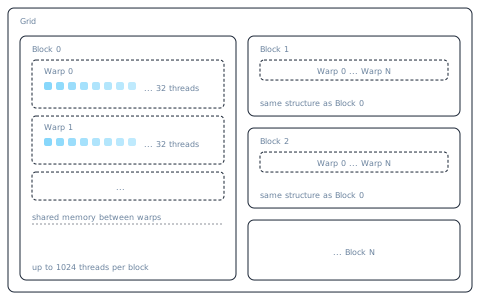
When using CUDA, it’s important to understand the execution model. A brief hierarchical overview from the bottom up:
- Thread: The most basic unit of execution, assigned a unique thread ID, and executes kernel code
- Warp: A group of 32 threads that receive the same instructions at the same time, but operate on different data
- Thread Block: A group of threads, up to 1024, that execute on the same Streaming Multiprocessor (SM) and can synchronize/communicate via shared memory
- Grid: The entire collection of thread blocks launched for a single operation To visualize this further, consider the example of adding two vectors of length 1024. This may involve launching 4 blocks, each with 256 threads, where thread 0 adds element 0, thread 1 adds element 1, and so on. Each thread runs the same code, but operates on different data, a concept known as Single Instruction Multiple Threads (SIMT). The kernel for this addition operation is provided below.
__global__ void add_kernel(float* a, float* b, float* out, int n) {
    int i = blockIdx.x * blockDim.x + threadIdx.x;
    if (i < n) {
        out[i] = a[i] + b[i];
    }
}
Notice that each thread computes what data it should operate on by finding the index from its block index and thread index.
Another key aspect to understand about GPU programming is that copying data from the CPU and GPU has a very high overhead. Dispatching individual operations to the GPU won’t realize the same speedups as keeping data on the GPU as long as possible. Ideally, we run the full forward and backward pass on the GPU and only copy the data back once it’s completed.
There are many other optimizations that can be discussed, but the ideas discussed here form the basis that everything else builds upon.